




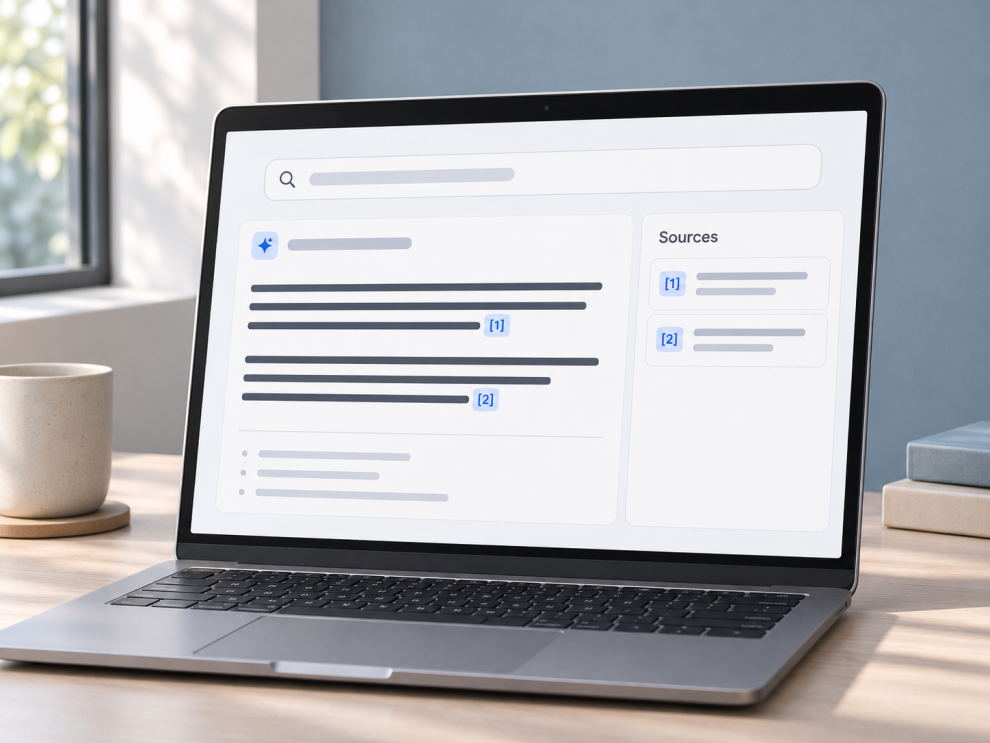

An AI search result might say, “Customers can request a refund within 30 days [1].” The citation looks useful until the reader opens it and discovers that the policy covers annual subscriptions only. The link works. The answer still overstates what the source says.
A React citation interface needs to preserve the relationship between a claim and its evidence. That relationship starts with the search provider or retrieval pipeline, travels through the API response, and ends with a citation the reader can inspect.
The distinction matters in practice. In the 2023 Enabling Large Language Models to Generate Text with Citations study, even the best systems evaluated on the ELI5 dataset lacked complete citation support in 50% of cases. That result describes a specific benchmark, but it illustrates a failure mode worth testing in any AI search product. An answer can contain citations while leaving important claims unsupported.
1. Define what the answer cites
A source is a document, page, or record. A citation connects part of the answer to that source. A locator identifies the supporting passage, such as a PDF page or document section. One source can support several claims, and each claim may point to a different passage.
For a React app, a useful API response contains three pieces:
| Field | Purpose |
|---|---|
| Answer segments | Text blocks with stable IDs and citation references |
| Citation references | The source ID and, when available, a locator for the relevant passage |
| Source metadata | A stable ID, title, destination, and any metadata the user is allowed to see |
Keep a separate list of retrieved search results if the product needs to display them. A page may have been retrieved because it matches the query without providing evidence for the generated claim. When a claim has no support, the product can show that it could not verify the claim, ask for more context, or leave the claim out. The choice depends on how consequential the answer is.
Normalize provider citations on the server
Providers attach evidence in different ways. OpenAI web search returns URL annotations with answer locations. Anthropic document citations attach evidence to text blocks and can include PDF page ranges or locations in supplied text. A server-side adapter can translate both into the same structure while preserving the provider’s original document and passage information.
If the provider sends answer offsets, apply them to the original output before trimming it or converting Markdown to HTML. Check how the specific API counts positions. JavaScript string indexes use UTF-16 code units, so applying an offset expressed in bytes directly to slice() can misplace a citation when the answer contains an emoji or multilingual text. Once the adapter resolves the positions, the browser can render segments and citation IDs directly.
2. Render inline citations and a source list in React
Put the inline marker beside the claim it supports. Then render a source list below the answer so readers can scan document titles and open a source independently. The example takes a normalized response, uses stable data IDs for React keys, and gives each numeric citation a descriptive accessible name. React recommends deriving keys from the data. Its useId hook is for IDs such as those used by accessibility attributes.
import { useId } from "react";

type Source = {
  id: string;
  number: number;
  title: string;
  url: string;
};

type Citation = {
  id: string;
  sourceId: string;
  locator?: string;
  passageUrl?: string;
};

type AnswerSegment = {
  id: string;
  text: string;
  citations: Citation[];
};

function webUrl(value: string): string | null {
  try {
    const url = new URL(value);

    if (
      (url.protocol === "https:" || url.protocol === "http:") &&
      !url.username &&
      !url.password
    ) {
      return url.href;
    }
  } catch {
    return null;
  }

  return null;
}

export function CitedAnswer({
  segments,
  sources,
}: {
  segments: AnswerSegment[];
  sources: Source[];
}) {
  const sourcesHeadingId = useId();
  const sourceById = new Map(sources.map(source => [source.id, source]));
  const citedIds = new Set(
    segments.flatMap(segment =>
      segment.citations.map(citation => citation.sourceId)
    )
  );
  const citedSources = sources
    .filter(source => citedIds.has(source.id))
    .sort((a, b) => a.number - b.number);

  return (
    <article>
      <p>
        {segments.map(segment => (
          <span key={segment.id}>
            {segment.text}
            {segment.citations.map(citation => {
              const source = sourceById.get(citation.sourceId);

              if (!source) return null;

              const href =
                webUrl(citation.passageUrl ?? "") ?? webUrl(source.url);

              if (!href) return null;

              const marker = `[${source.number}]`;
              const location = citation.locator ? `, ${citation.locator}` : "";

              return (
                <sup key={citation.id}>
                  {" "}
                  <a
                    href={href}
                    aria-label={`${marker} ${source.title}${location}`}
                  >
                    {marker}
                  </a>
                </sup>
              );
            })}
          </span>
        ))}
      </p>

      {citedSources.length > 0 && (
        <section aria-labelledby={sourcesHeadingId}>
          <h2 id={sourcesHeadingId}>Sources</h2>
          <ol>
            {citedSources.map(source => {
              const href = webUrl(source.url);

              return (
                <li key={source.id} value={source.number}>
                  {href ? <a href={href}>{source.title}</a> : source.title}
                </li>
              );
            })}
          </ol>
        </section>
      )}
    </article>
  );
}
The adapter supplies each display number once, then reuses it every time that source is cited. It can also supply a passage URL when the source has a stable deep link. For private documents, authorize access on the server before returning titles, excerpts, or links, and recheck permissions when the destination opens. A browser-side URL check validates the shape of a destination. Access control belongs on the server.
3. Keep citations stable while the answer streams
Answer text can arrive before its citation metadata. Treat streaming updates as part of the same answer and merge them by stable segment and citation IDs. If the stream delivers a marker before it supplies a destination, wait until the source resolves before rendering the link. Keep a source’s display number fixed once it becomes visible.
For example, a segment can arrive first, followed by a citation for “Policy handbook, page 12.” The UI can display the segment immediately, then add the marker next to it once the citation resolves. Anthropic documents a version of this pattern in which citations_delta events add citations to the current text block.
Test the interrupted-stream case as well. An incomplete answer should have a visible status, and unresolved citations should stay out of the link list. When a user starts a new search, ignore late events from the previous request so its citations cannot attach to the new answer.
4. How five companies handle evidence and attribution
| Company | Documented practice | What React teams can apply |
|---|---|---|
| OpenAI | Web search returns URL annotations with titles and locations in the answer. OpenAI requires prominent, clickable inline citations when displaying information from those web results. | Preserve claim-level annotation positions and make the original source easy to open. |
| Anthropic | Claude document citations can include cited text and locations in PDFs, plain text, or custom content blocks. | Show a page number or passage when the provider supplies one, especially for long documents. |
| Google Cloud’s grounding documentation calls for showing web grounding sources both inline and in aggregate. | Support both claim-level verification and a consolidated source list. | |
| Perplexity | Its search interface offers direct source links and a side panel where readers can inspect sources alongside the answer. | Keep the claim in view while readers inspect its evidence, particularly on longer answers. |
| GeekyAnts | Its PsyFi case study describes checking AI-generated monetary figures against the user’s financial records and flagging unsupported figures. The documented practice is validation against private data. | For numerical claims, check the underlying record before presenting the figure as supported. Give authorized users a way to inspect the relevant record where the product permits it. |
5. Test whether citations actually support the answer
A rendering test can confirm that [2] opens the second source. A separate evidence review can check whether that source supports the sentence beside it. Track both citation correctness, whether each cited passage supports the claim, and citation coverage, whether the claims that need evidence have it. The ALCE research treats citation quality as a separate evaluation dimension from answer fluency and correctness.
- Mapping: Test repeated sources, multiple sources for one claim, missing source IDs, and malformed URLs.
- Evidence: Sample answers with dates, figures, exceptions, and qualifications. Check the exact passage for each claim.
- Streaming and accessibility: Test delayed annotations, cancelled requests, keyboard navigation, and whether screen readers announce the source title with the citation number.
For public pages intended for search indexing, use regular <a href> links and render the answer and source list in the initial HTML when practical. Google can render JavaScript and discover dynamically inserted anchors, but server-rendered links can be discovered earlier. This is a crawlability consideration. The editorial quality of the answer still depends on whether the cited passages support it. d
The most revealing release test starts with a single claim. Pick a sentence with a number or an exception, open its citation, and see whether the passage supports the full statement. If it only supports part of the claim, correct the answer or its evidence mapping before shipping.



Add Comment