







A mobile application cannot assume that a network request will always succeed.
Users move between Wi-Fi and cellular networks, enter areas with poor connectivity, enable airplane mode, or lose internet access while a request is already in progress. For an online-only application, that usually means showing an error.
For an offline-capable React Native application, the architecture has to do more.
The application should be able to keep useful data available, accept changes locally, queue operations, retry them later, and deal with conflicts when local and server state diverge.
That makes offline state management less about detecting connectivity and more about designing a reliable data flow.
What Does Offline-First Mean in React Native?
Offline-first doesn’t necessarily mean that an application must work without the internet indefinitely.
It means the application is designed so that temporary connectivity loss doesn’t immediately make the user experience unusable.
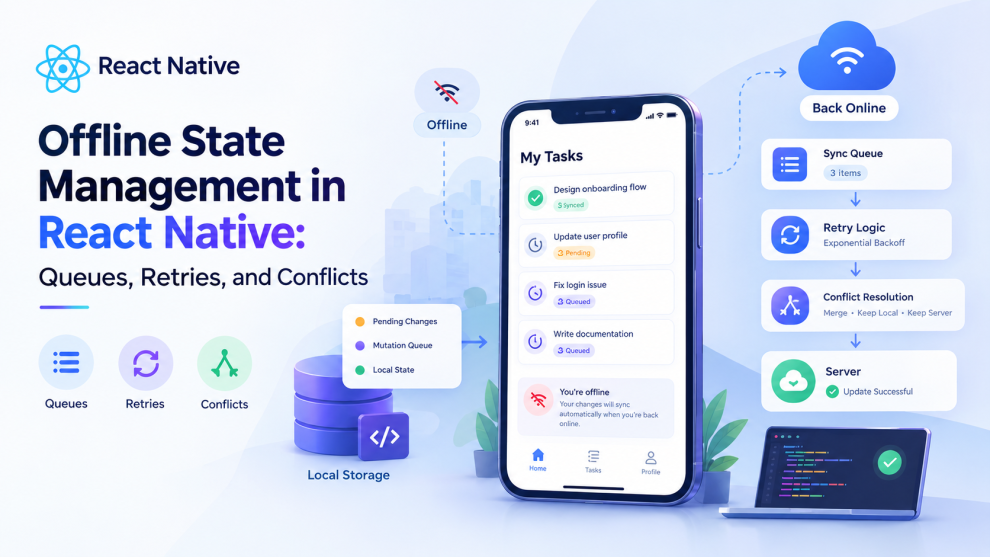
A typical flow looks like:
User Action
    ↓
Local State / Local Database
    ↓
Update UI Immediately
    ↓
Write Operation to Queue
    ↓
Network Available?
   / \
 No   Yes
 ↓     ↓
Wait   Sync
       ↓
    Server
       ↓
Update Local State
This approach separates local responsiveness from network availability.
For applications such as field-service tools, inventory apps, messaging, note-taking, logistics, or collaborative workflows, that distinction can be important.
Network Status Is Not the Same as Internet Availability
React Native applications commonly use @react-native-community/netinfo to observe network state.
It exposes both isConnected and isInternetReachable, along with connection type and other information.
That distinction matters.
A device can be connected to a Wi-Fi network while that network has no usable internet connection.
A basic hook might look like:
import { useNetInfo } from '@react-native-community/netinfo';

export function NetworkStatus() {
  const { isConnected, isInternetReachable } = useNetInfo();

  const online =
    isConnected === true &&
    isInternetReachable !== false;

  return null;
}
But connectivity should not become the source of truth for application data.
Network state should trigger synchronization decisions. It should not determine whether the user is allowed to interact with locally available data.
Also account for the initial null/unknown state: NetInfo documents that connectivity values can initially be unknown.
Separate Server State From Local State
A useful architecture starts by distinguishing different kinds of state.
UI state
Examples:
- Modal visibility
- Selected tab
- Form focus
- Loading indicators
Server state
Examples:
- User profile
- Orders
- Products
- Messages
- Project records
Local persistent state
Examples:
- Drafts
- Pending changes
- Offline-created records
- Cached data
Trying to manage all three with the same mechanism can make offline behavior difficult to reason about.
For server-state-heavy applications, a library such as TanStack Query can handle caching, mutations, network modes, and persistence. Its current documentation supports persisted query and mutation state through persisters.
For applications with more complex offline requirements, a local database can become the primary source for the UI, with synchronization operating in the background.
The Offline Mutation Queue
Reading cached data is relatively straightforward.
Writing data while offline is harder.
Suppose a user edits a customer record:
Edit customer
     ↓
Save locally
     ↓
Add mutation to queue
     ↓
Show "Pending sync"
A queue item might contain:
type OfflineOperation = {
  id: string;
  type: 'create' | 'update' | 'delete';
  entity: string;
  entityId: string;
  payload: unknown;
  createdAt: number;
  attempts: number;
};
The important part is that the queue should be durable.
Keeping pending operations only in React component memory means they can disappear when the application is terminated.
Instead, store the queue in persistent storage or a local database.
A production queue should also have an explicit lifecycle:
pending
   ↓
processing
   ↓
succeeded

processing
   ↓
failed
   ↓
retry / conflict / permanent failure
That makes failures observable instead of silently disappearing.
Don’t Retry Every Error
Retries are useful, but blindly retrying every failed request can make an application worse.
Consider these categories:
| Failure | Typical handling |
|---|---|
| Temporary network failure | Retry |
| Timeout | Retry with backoff |
| HTTP 429 | Retry according to server guidance |
| HTTP 500/503 | Usually retry |
| HTTP 400 | Usually don’t retry automatically |
| HTTP 401 | Refresh authentication or require login |
| HTTP 403 | Surface authorization problem |
| Validation error | Fix data rather than retry |
| Conflict | Resolve explicitly |
TanStack Query, for example, does not retry mutations by default, but allows retry policies to be configured. Its offline behavior can pause mutations and resume them when connectivity returns.
The general principle is:
Retry transient failures, not permanent failures.
Use Exponential Backoff
Imagine an API is temporarily unavailable.
Retrying immediately can produce:
Request
Request
Request
Request
Request
from thousands of devices at roughly the same time.
A better strategy is exponential backoff with jitter:
const delay = Math.min(
  baseDelay * 2 ** attempt,
  maxDelay
);

const jitter = Math.random() * 500;

await sleep(delay + jitter);
For example:
Attempt 1 → ~1 second
Attempt 2 → ~2 seconds
Attempt 3 → ~4 seconds
Attempt 4 → ~8 seconds
The exact values should depend on the API and product requirements.
A maximum retry count is also important. Some operations should eventually move into a failed or needs attentionstate rather than retry forever.
Ordering Matters
Not every queued operation is independent.
Consider:
1. Create project
2. Add task to project
3. Rename task
Sending operation #3 before #1 succeeds may fail because the project doesn’t exist on the server yet.
For dependent operations, preserve ordering or model dependencies explicitly.
A simple FIFO queue can work when operations are independent and ordering is important.
More complex applications may need:
Create Project
      ↓
Create Task
      ↓
Update Task
with dependency identifiers connecting the operations.
This is particularly important when users can create new entities while completely offline.
Optimistic UI Makes Offline Apps Feel Faster
An offline-capable application shouldn’t make users wait for the server before reflecting every change.
For example:
User marks task complete
        ↓
UI immediately shows completed
        ↓
Mutation queued
        ↓
Server sync later
This is an optimistic update.
However, optimistic UI requires a rollback or reconciliation strategy.
If the server eventually rejects the change, the application needs to decide whether to:
- Revert the local change
- Show an error
- Ask the user to resolve it
- Keep the local version and retry
- Merge it with the server version
Optimistic updates are therefore tightly connected to conflict management.
Conflict Resolution Is the Hard Part
Imagine two devices edit the same record.
Device A
Title = "Project Alpha"

Device B
Title = "Project Beta"
Both were offline.
Device A synchronizes first.
Then Device B reconnects.
Which title should win?
There isn’t one universally correct answer.
Common strategies include:
Last-write-wins
The most recent update replaces the previous value.
Simple, but potentially destructive.
Server-wins
The server version always takes precedence.
Useful for some authoritative data, but local changes can disappear.
Client-wins
The local version overwrites the server.
Useful in specific workflows but risky when multiple users collaborate.
Field-level merging
Instead of treating the record as one object:
A changes title
B changes description
the system can merge the two changes.
Manual resolution
For important business data, show the conflicting versions and let the user choose.
The correct strategy depends on the domain.
A note-taking app can tolerate different rules from an inventory, financial, healthcare, or collaborative editing application.
Version Numbers Make Conflicts Easier to Detect
One useful pattern is optimistic concurrency control.
A server record might include:
{
  "id": "123",
  "title": "Project Alpha",
  "version": 7
}
The client sends:
{
  "title": "Project Beta",
  "expectedVersion": 7
}
If another client has already changed the record to version 8, the server can reject the update instead of silently overwriting the newer data.
The client can then enter a conflict state:
Local version
      +
Server version
      ↓
Conflict resolver
      ↓
Merged / Local / Server
This is often safer than silently applying last-write-wins to every record.
Local Databases vs Query Caches
A query cache and a local database solve related but different problems.
Query cache
Useful when the application mainly needs:
- Cached server responses
- Background refetching
- Mutation management
- Request deduplication
- Server-state synchronization
TanStack Query supports persisted query and mutation state, including restoring persisted state and resuming paused mutations.
Local database
More appropriate when offline behavior is a central product requirement and the application needs:
- Large datasets
- Structured local queries
- Durable writes
- Complex relationships
- Long offline periods
- Synchronization between local and remote records
The architectural question should therefore be:
Is offline support a cache feature, or is the local database part of the product’s data architecture?
A Practical React Native Offline Architecture
A scalable implementation might look like:
              React Native UI
                    ↓
             State / View Model
                    ↓
             Local Data Store
              ↙           ↘
        Read locally     Write locally
                            ↓
                       Sync Queue
                            ↓
                     Network Manager
                            ↓
                         API
                            ↓
                  Conflict Detection
                            ↓
                    Local Store Update
Connectivity events can trigger the synchronization worker, but the queue itself should remain durable.
This means reconnecting to the internet doesn’t require the UI to manually replay every request.
What to Test
Offline functionality needs more than the usual API tests.
Test scenarios such as:
- App starts without internet
- Network disappears during a request
- User creates multiple records offline
- App is killed with pending operations
- Device reconnects after several hours
- Server returns 401
- Server returns 429
- Server returns 500
- Same record changes on two devices
- Operations arrive out of order
- Duplicate requests are received
- Local database contains stale data
Also test transitions between Wi-Fi, cellular, and no connectivity rather than testing only a simple online/offline toggle.
NetInfo exposes connection type and reachability information, but the library’s own documentation notes that behavior can differ across platforms and that the initial network state can be unknown.
Final Takeaway
Offline state management in React Native is not simply:
if offline → show offline screen
A production-ready offline architecture needs several layers:
Local state → durable queue → retry policy → synchronization → conflict detection → reconciliation.
Connectivity detection is only the trigger.
The real reliability comes from ensuring that user actions aren’t lost when the network disappears, transient failures don’t create request storms, and conflicting changes aren’t silently overwritten.
For simple applications, persisted TanStack Query state and controlled mutations may be enough. For applications where offline operation is fundamental, a local database and explicit synchronization layer provide a stronger foundation.
The key is to design offline behavior before connectivity problems become production bugs.
An application that assumes the network will always be available is easy to build.
An application that remains trustworthy when the network isn’t available requires a data architecture designed for failure.





Add Comment