











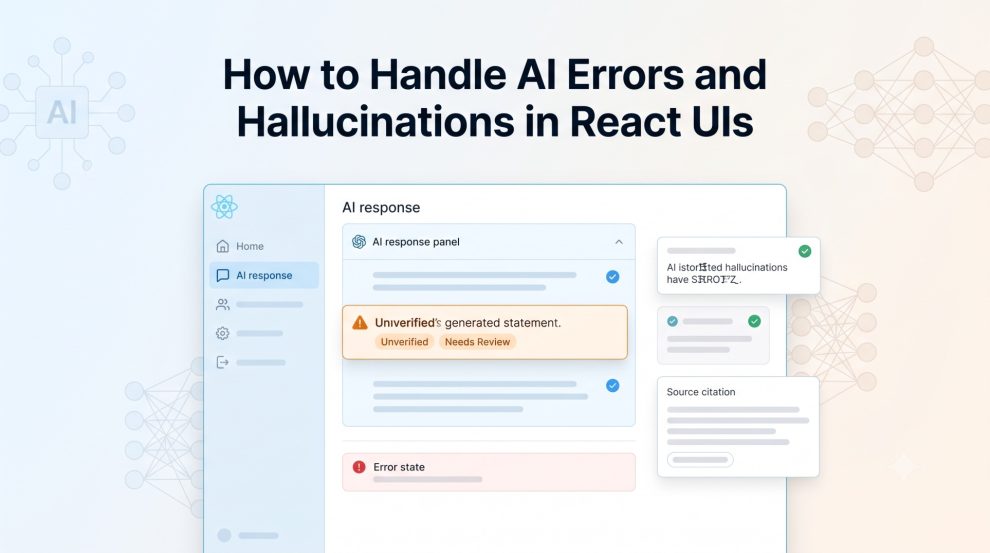

Generative AI changes what frontend developers need to consider an “error.”
In a traditional React application, an error usually has a recognizable technical cause. An API times out. A request returns a 500 response. JSON cannot be parsed. A component crashes.
AI-powered applications introduce another category: the request succeeds, the UI renders correctly, but the information displayed to the user is wrong.
That distinction matters.
NIST describes this problem as “confabulation,” where generative AI systems confidently produce erroneous or false information. NIST specifically identifies it as a risk because users can be misled even when an answer appears credible.
OpenAI similarly notes that hallucinations remain a challenge even as language models become more capable. One reason is that models may generate a plausible answer rather than acknowledge that the correct answer cannot be determined.
For React developers building AI interfaces, reliability therefore cannot stop at catching exceptions. The frontend needs to account for technical failure, invalid data, uncertainty, and potentially incorrect AI output.
AI Errors and AI Hallucinations Are Different Problems
A useful React architecture treats AI failures as several different layers.
A transport error occurs when the frontend cannot communicate with the AI service.
A system error happens when the backend or model provider returns an error, rate limit, timeout, or unavailable response.
A format error occurs when the AI returns something, but the response does not conform to the structure the application expects.
A hallucination or semantic error is more complicated. The application receives perfectly valid data, but one or more claims inside it may be false.
Consider a financial research application.
The model might return:
{
  "company": "Example Corp",
  "revenue": "$4.2 billion",
  "source": "2025 annual report"
}
React can render this object without any problem.
The API returned 200 OK.
The JSON schema is valid.
No JavaScript exception occurred.
But if the annual report actually says $3.7 billion, the application has still failed.
That is why normal frontend error handling alone is insufficient for an AI product.
Use Error Boundaries for React Failures, Not Hallucination Detection
React Error Boundaries remain useful in AI applications because generated content often feeds components with unpredictable states.
React’s documentation explains that when rendering throws an error, React can remove the affected UI. Wrapping a section in an Error Boundary lets the application render fallback content instead. (React)
For example:
<ErrorBoundary fallback={<AIResponseError />}>
  <AIResponsePanel response={response} />
</ErrorBoundary>
This protects the rest of the application if the response renderer crashes.
But there is an important limitation.
React states that Error Boundaries do not normally catch errors from event handlers, server-side rendering, asynchronous callbacks such as setTimeout, or errors thrown inside the boundary itself.
More importantly, an Error Boundary has no way to know whether:
“The Federal Reserve changed this rule in March 2026.”
is true.
From React’s perspective, that is simply a string.
Hallucination protection therefore needs to happen before or alongside presentation.
Validate AI Responses Before Rendering Them
One of the most effective patterns for production AI applications is to reduce the amount of unrestricted text that the frontend must interpret.
Instead of asking the model for arbitrary output, define a response contract.
For example:
type AIAnswer = {
  answer: string;
  sources: {
    title: string;
    url: string;
  }[];
  status: "verified" | "unverified";
};
The frontend can then validate the response before treating it as trusted application data.
A React component might handle the result like this:
if (!response.answer) {
  return <InvalidResponse />;
}

if (response.status === "unverified") {
  return (
    <AIAnswerCard
      answer={response.answer}
      warning="This answer has not been verified."
    />
  );
}

return <VerifiedAnswer response={response} />;
Runtime schema validation libraries such as Zod, Valibot, or JSON Schema can add another layer between the LLM response and React components.
This will not prove that every claim is correct, but it prevents malformed or unexpected model output from flowing directly into application logic.
Do Not Make the AI Sound More Certain Than It Is
A major UI mistake is turning probabilistic model output into an authoritative-looking answer.
Compare:
Your insurance claim is eligible.
with:
Based on the information provided, the claim appears potentially eligible. Confirm against the policy terms before proceeding.
The underlying AI output might be identical, but the interface communicates a very different level of certainty.
This matters because OWASP lists LLM misinformation among its Top 10 risks for LLM applications. OWASP warns that false but credible-looking output can create reputational, legal, and security risks, particularly when users over-rely on generated information. (OWASP)
The frontend should therefore help users understand what the AI knows, what it inferred, and what still requires verification.
Show Sources Where Verification Matters
One of the strongest UI patterns for factual AI products is making evidence part of the answer.
Instead of:
The maximum contribution is $X.consider:
The maximum contribution is $X.

Sources:
IRS Publication...
Updated:...
The underlying system should ideally use retrieval from trusted documents and return the actual evidence used to construct the answer.
The React interface can then make citations expandable:
<AIAnswer>
  <AnswerText>{answer}</AnswerText>

  <SourcePanel sources={sources} />

  {!verified && (
    <VerificationNotice>
      Verify this information before making a financial decision.
    </VerificationNotice>
  )}
</AIAnswer>
OWASP specifically recommends validating important outputs against trusted external sources, implementing human oversight for sensitive information, clearly communicating AI limitations, and designing interfaces that encourage responsible use. (OWASP)
A tiny disclaimer hidden in the footer does much less than putting evidence directly beside the generated claim.
Handle Uncertainty as a Normal Application State
React applications commonly model states such as:
loading
success
error
AI interfaces often need more.
A more realistic model could be:
loading
verified
partially_verified
uncertain
invalid
failed
This allows the interface to behave differently when the system cannot establish a reliable answer.
For example, an uncertain response might display:
We couldn’t verify this information from the available sources. Try changing the question or review the source documents directly.
That outcome is better than forcing the model to produce an answer.
OpenAI’s research on hallucinations argues that evaluation systems can inadvertently reward guessing rather than acknowledging uncertainty. Designing the product so that “I don’t know” is an acceptable state helps avoid reproducing that same incentive at the application layer. (OpenAI)
Be Careful With Confidence Scores
It may seem obvious to display something like:
AI Confidence: 92%But confidence displays require care.
Google’s People + AI guidance notes that model confidence can sometimes help users determine how much trust to place in an AI prediction, but confidence information can also be difficult for users to interpret. Google recommends testing how confidence is presented rather than assuming a numerical score automatically improves understanding. (Google Codelabs)
For generative AI specifically, developers should avoid creating a percentage merely because the UI needs one.
If the backend cannot produce a calibrated, meaningful confidence measure, labels such as Verified against 4 sources, Source unavailable, or Needs review may be more useful than an arbitrary “95% confident.”
Design Loading and Failure States With Suspense
AI generation can also take significantly longer than a conventional API call.
React’s <Suspense> component allows developers to display fallback content while supported asynchronous resources are still loading. React documents Suspense as a mechanism for displaying fallback UI until its children are ready. (React)
A simplified architecture might look like:
<ErrorBoundary fallback={<AIError />}>
  <Suspense fallback={<GeneratingAnswer />}>
    <AIResult />
  </Suspense>
</ErrorBoundary>
However, React also notes that Suspense does not automatically detect data fetched inside an Effect or ordinary event handler. The data layer or framework needs to support Suspense correctly. (React)
For AI interfaces, the loading state should also explain what is happening rather than leaving users staring at an indefinite spinner.
“Searching documents and generating an answer” communicates considerably more than “Loading…”
Never Let Unverified AI Output Trigger Critical Actions Automatically
The risk increases when an AI response moves beyond text and begins controlling application behavior.
Imagine an AI assistant producing:
{
  "action": "refund_customer",
  "amount": 4200
}
A React interface should not blindly convert that response into:
processRefund(aiResponse.amount);The AI output should pass through deterministic validation, authorization rules, business logic, and, where appropriate, human approval.
The interface should clearly distinguish between AI recommendation and approved action.
This is particularly important in financial services, healthcare, insurance, legal software, enterprise workflows, and agentic applications where an inaccurate output can create consequences beyond a bad chatbot response.
Build Feedback Into the React UI
Hallucinations cannot be completely eliminated, so production systems also need a way to learn from failures.
A useful answer component can include lightweight controls such as:
Helpful
Incorrect information
Source doesn't support answer
Outdated information
Other
The frontend can send the response, source IDs, model version, prompt or trace ID, and feedback category to an evaluation pipeline.
Google’s long-standing machine-learning engineering guidance recommends tracking metrics, studying patterns in measured errors, testing infrastructure independently, and monitoring silent failures. Those principles remain highly relevant when LLM functionality is added to a production frontend.
The goal is not simply to record that users clicked thumbs down. Teams need enough context to determine why the answer failed.
Reliable AI UX Requires More Than a Better Model
Handling AI hallucinations in React is ultimately an application architecture problem, not just a model-selection problem.
React can protect the interface from rendering failures. Schema validation can block malformed responses. Retrieval and verification systems can provide evidence. UX patterns can communicate uncertainty. Human review can protect high-risk workflows. Feedback and monitoring can reveal recurring weaknesses.
None of these mechanisms guarantees that an LLM will never produce incorrect information.
They do something more practical: they prevent one uncertain model response from automatically becoming a trusted product decision.
That is the standard production AI applications should aim for.
When an AI system succeeds, the interface should make the answer easy to use. When the system is uncertain, the interface should make that uncertainty visible. And when something fails, the user should always have a safe way forward.








Add Comment