











AI interfaces expose a React problem that normal CRUD applications rarely face: the data is useful before it is complete.
A conventional API request usually follows a simple lifecycle. The application requests data, waits, receives a finished object, and renders it. An AI response behaves differently. Text can arrive incrementally, tool calls can appear halfway through a response, structured data can remain invalid until later chunks arrive, and the user may start another request before the first one has finished.
That means React AI streaming is not just a networking problem. It is a state-management and rendering problem.
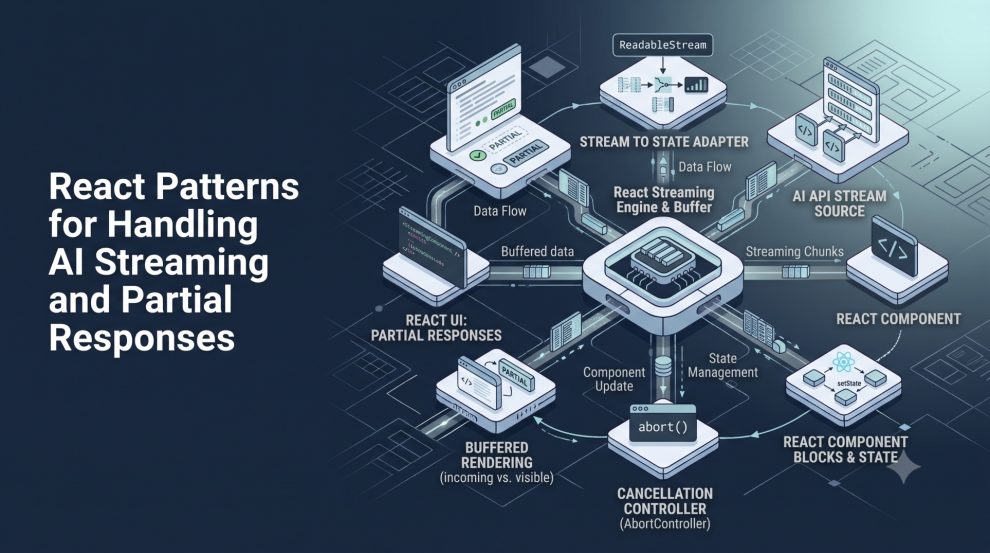
My preferred way to think about it is simple: do not treat a streaming AI response as a string that happens to grow. Treat it as an evolving operation with transport state, partial content, semantic events, cancellation, and a final committed result.
Start With the Browser Stream, Not a Fake Typing Effect
The browser already provides the primitives needed for incremental responses.
A fetch() response body is exposed as a ReadableStream, allowing the application to process data before the complete response has been downloaded. MDN notes that this lets applications process responses incrementally rather than buffering the entire body first. ReadableStream itself has broad browser availability, while TextDecoderStream, which is convenient for decoding UTF-8 byte streams into strings, has been broadly available since September 2022.
A minimal React-side reader can look like this:
async function readAIStream(url: string, signal: AbortSignal) {
  const response = await fetch(url, { signal });

  if (!response.ok) {
    throw new Error(`Request failed: ${response.status}`);
  }

  if (!response.body) {
    throw new Error("Streaming response body is unavailable");
  }

  const stream = response.body.pipeThrough(new TextDecoderStream());

  let output = "";

  for await (const chunk of stream) {
    output += chunk;
    console.log(output);
  }

  return output;
}
The important point is that network chunks are transport units, not UI units.
A chunk may contain half a sentence, several tokens, multiple events, or part of a JSON object. React code should never assume one received chunk equals one meaningful piece of AI output.
Model Streaming as a State Machine
A boolean such as isLoading quickly becomes inadequate.
An AI request can be waiting for the server, actively streaming, successfully completed, manually stopped, interrupted by a network error, or superseded by another user request.
I prefer an explicit state model:
type StreamStatus =
  | "idle"
  | "submitting"
  | "streaming"
  | "completed"
  | "aborted"
  | "error";
That small decision improves the UI considerably.
A submit button can behave differently while submitting. A stop button only needs to appear during streaming. An aborted response can remain visible without being falsely presented as complete. Retry behavior can distinguish transport failure from user cancellation.
This becomes even more important once AI responses include tool calls or multiple content types. Current APIs already represent streaming this way. For example, OpenAI’s Responses API emits typed stream events such as text delta and text completion events instead of pretending the entire interaction is one expanding string.
The frontend architecture should preserve that structure whenever possible.
Do Not Re-render the Entire Message Tree for Every Chunk
The easiest implementation is also the one I would avoid for larger interfaces:
for await (const chunk of stream) {
  setText((current) => current + chunk);
}
This works, but every chunk can trigger another React update.
Whether that becomes expensive depends on stream frequency and component complexity. Plain text may be cheap. A large conversation containing Markdown rendering, syntax highlighting, citations, expandable tool calls, tables, and interactive components can be much more expensive.
A better pattern is to separate network frequency from render frequency.
I usually prefer accumulating incoming text in a ref and committing it to React state on animation frames:
const pendingRef = useRef("");
const frameRef = useRef<number | null>(null);

function queueChunk(chunk: string) {
  pendingRef.current += chunk;

  if (frameRef.current !== null) return;

  frameRef.current = requestAnimationFrame(() => {
    const pending = pendingRef.current;

    pendingRef.current = "";
    frameRef.current = null;

    setText((current) => current + pending);
  });
}
The network can continue delivering chunks as quickly as it wants, while the UI batches multiple arrivals into a smaller number of visible updates.
The goal is not to artificially slow down the AI. It is to prevent transport granularity from dictating React’s rendering granularity.
Keep the Active Stream Separate From Completed Messages
Another pattern I avoid is repeatedly rebuilding the entire message array while the newest assistant response streams.
Instead, I prefer separating committed conversation history from the active response.
const [messages, setMessages] = useState<Message[]>([]);
const [streamingText, setStreamingText] = useState("");
The UI can render:
<>
  {messages.map((message) => (
    <Message key={message.id} message={message} />
  ))}

  {streamingText && (
    <StreamingMessage content={streamingText} />
  )}
</>
Once generation finishes, the temporary response becomes a normal message.
setMessages((current) => [
  ...current,
  {
    id: crypto.randomUUID(),
    role: "assistant",
    content: streamingText,
  },
]);

setStreamingText("");
This keeps stable historical messages stable.
It also makes memoization more effective because ten completed conversation turns do not need to behave as though they are changing every time the latest answer receives another fragment.
Abort Stale Responses Aggressively
Cancellation should be part of the first version of an AI interface, not an enhancement added later.
Imagine a user asks one question, sees the answer begin, and immediately submits another. If the original request continues updating the same state, the interface can end up mixing responses or allowing an older request to overwrite newer state.
AbortController exists specifically for canceling operations such as fetch requests and response streams. Calling abort() can cancel both the request and consumption of the response body.
A React pattern might look like this:
const controllerRef = useRef<AbortController | null>(null);

async function generate(prompt: string) {
  controllerRef.current?.abort();

  const controller = new AbortController();
  controllerRef.current = controller;

  setStatus("submitting");
  setStreamingText("");

  try {
    const response = await fetch("/api/generate", {
      method: "POST",
      signal: controller.signal,
      headers: {
        "Content-Type": "application/json",
      },
      body: JSON.stringify({ prompt }),
    });

    setStatus("streaming");

    // Consume response...
  } catch (error) {
    if (controller.signal.aborted) {
      setStatus("aborted");
      return;
    }

    setStatus("error");
  }
}
I would also abort the active request when the relevant component unmounts.
This solves more than a UX problem. It establishes clear ownership of asynchronous work.
Partial JSON Requires a Different Strategy From Partial Text
Text is forgiving.
If an AI response currently contains:
The best React pattern for stre
React can safely display it.
JSON is different.
This is invalid:
{
  "title": "React Streaming",
  "tags": ["react",
Calling JSON.parse() every time another fragment arrives is therefore the wrong abstraction.
For structured streaming, I prefer one of two approaches.
The first is a protocol containing complete semantic events. The server buffers incomplete data and only sends complete events such as text_delta, citation, tool_started, tool_finished, or metadata.
The second is using a library that already understands structured AI streams.
Vercel’s AI SDK, for example, models chat messages as parts that can represent text, tool invocations, tool results, and other content instead of forcing every response into one text property. Its React tooling then constructs UI messages as the stream arrives.
That architecture will age much better than concatenating everything into one Markdown string.
Use React Concurrency for Expensive Rendering, Not for Receiving the Stream
React’s concurrent rendering APIs are useful here, but they solve a different problem.
useDeferredValue lets a part of the UI lag behind a more urgent value. React can keep the current content visible while attempting the deferred render in the background, and that background render is interruptible. Importantly, React’s documentation explicitly notes that useDeferredValue does not reduce network requests. It changes rendering priority, not transport behavior.
That makes it useful when a streaming response feeds an expensive view.
For example:
const deferredText = useDeferredValue(streamingText);

return (
  <>
    <PlainStreamingText text={streamingText} />

    <ExpensiveMarkdownPreview text={deferredText} />
  </>
);
I would not necessarily render both in a real product, but the pattern illustrates the separation.
The latest text can remain responsive while expensive secondary rendering follows at React’s preferred pace.
startTransition and useTransition can similarly mark non-urgent UI updates. React documents Transition updates as non-blocking and interruptible.
The rule I follow is straightforward: do not use React concurrency to compensate for a badly designed stream protocol. Fix the transport model first, then use concurrency to optimize expensive presentation work.
Suspense Is Not a Per-Token Streaming Mechanism
Suspense is often mentioned whenever React and streaming appear in the same conversation, but it is easy to apply it to the wrong layer.
React Suspense works extremely well for framework-integrated data loading, lazy components, streaming server rendering, and promises read through Suspense-enabled mechanisms.
However, React’s own documentation notes that Suspense does not automatically detect data fetched inside an Effect or an event handler.
A chat response started when the user clicks Send is therefore not magically managed by wrapping the chat bubble in:
<Suspense fallback={<Spinner />}>
  <AssistantMessage />
</Suspense>
For client-side token or delta streaming, explicit stream state is usually clearer.
Suspense still has an important role around the larger interface. Conversation history, retrieved documents, route-level data, lazily loaded Markdown components, or server-rendered content can all use Suspense independently of the active AI generation stream.
Render Partial Markdown Carefully
Markdown creates another subtle problem.
While text streams, the response may temporarily contain incomplete syntax:
Here is the example:

```tsx
function App() {
A Markdown renderer needs to survive that state without causing visual instability.
My preference is to keep the raw streaming response authoritative and treat formatted Markdown as a projection of it.
Avoid modifying the actual AI output to “repair” incomplete Markdown while generation is running. Temporary rendering heuristics can help presentation, but the final response should always come from the actual completed stream.
The same principle applies to citations, code blocks, tables, and links.
Partial content is temporary state, not corrupted final state.
The Pattern I Would Ship
For a production React AI interface, I would keep the architecture divided into four layers:
AI Provider
     ↓
Server Stream Adapter
     ↓
Typed UI Events
     ↓
React Stream State
     ↓
Presentation Components
The provider layer deals with vendor-specific APIs.
The server adapter converts those provider events into an application-owned protocol.
React manages a small stream state machine containing the active request, partial parts, status, cancellation, and errors.
Presentation components then render text, tools, sources, files, reasoning summaries, or other supported parts without needing to know which AI vendor generated them.
This separation becomes particularly valuable when switching models or providers later.
The React component should care that it received a text_delta.
It should not care whether that delta originated from OpenAI, Anthropic, Gemini, a local model, or another inference platform.
Final Thoughts
The first version of AI streaming in React is easy to build.
Read chunks. Append them to state. Render the growing string.
The production version requires a different mindset.
Streaming responses should have explicit lifecycle state. Requests should be cancelable. Transport chunks should be converted into semantic events. Completed messages should remain stable while the active response changes. Expensive formatting should not be allowed to dictate interaction responsiveness.
Most importantly, partial data should be treated as a normal product state.
That is the real difference between adding an AI response to a React page and designing a React interface that was actually built for AI.
As AI applications expand from simple chat into tools, agents, citations, structured output, and multimodal responses, that distinction will matter even more.







Add Comment