








AI applications have changed what users expect from a web interface.
A traditional web app can get away with a spinner while an API request completes. An AI application usually can’t. Users expect responses to stream, tools to show progress, generated content to appear incrementally, and the interface to remain interactive while the model is working.
My take: real-time UX should be treated as part of the AI architecture, not as a frontend finishing touch.
React is particularly well suited to this because its component model makes it possible to represent continuously changing application state without turning the UI into one giant rendering problem.
What Makes an AI Interface “Real-Time”?
It isn’t simply WebSockets.
A good AI interface may need to handle:
- Streaming model responses
- Partial results
- Tool-call status
- Live progress indicators
- Optimistic updates
- Interruptions and cancellations
- Conversation state
- Generated UI components
- Error recovery
- Real-time data from external systems
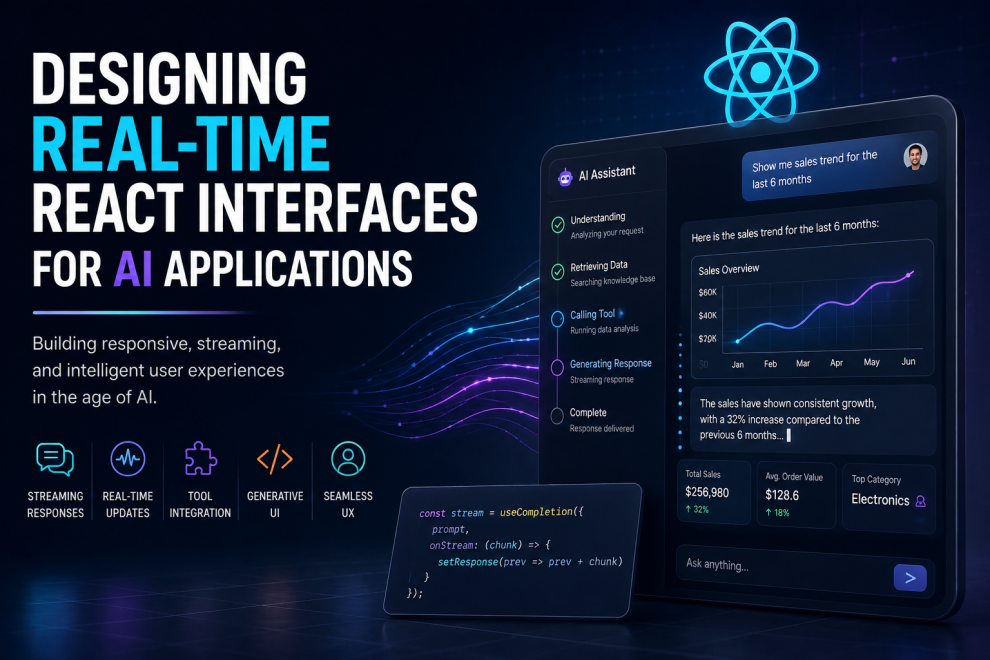
For example, instead of waiting 10 seconds for an AI response, the interface can display the response progressively as tokens arrive. Streaming can significantly improve perceived responsiveness, and current React/Next.js tooling makes this pattern increasingly straightforward.
That changes the frontend architecture.
The UI Should Reflect the AI’s State
One of the biggest mistakes I see in AI products is treating the model as a black box.
The user clicks Send.
A spinner appears.
Eventually, some text appears.
That’s not a great AI experience.
A better interface can communicate:
Thinking → Retrieving information → Calling tool → Processing result → Generating response → Complete
The user doesn’t necessarily need to see every internal operation, but the interface should communicate enough to establish trust.
This is especially important for agents that perform multiple actions before producing an answer.
Streaming Should Be the Default
I’m firmly in the stream-first camp.
If an AI response can be streamed, I don’t see much reason to make users wait for the entire response.
Vercel’s current guidance makes the same case: streaming allows applications to render chunks as they become available instead of waiting for the complete response. For AI applications, this means users can see generated text progressively.
A simplified architecture looks like:
React UI
   ↓
Next.js / API Route
   ↓
AI Gateway
   ↓
LLM
   ↓
Streaming Response
   ↓
React State
   ↓
Incremental UI Updates
The important part is that the UI doesn’t treat the response as one giant object.
It consumes a stream.
Generative UI Is More Interesting Than Chat
I also think the industry is going too far with the “AI chatbot” pattern.
A chat window isn’t automatically a good AI interface.
If an AI system is helping a user analyze sales data, why return a paragraph describing the data?
Show the chart.
If it is helping configure a workflow, show the workflow.
If it finds three products, show product cards.
This is where generative UI becomes interesting.
Vercel has demonstrated approaches for streaming React components from AI responses, moving beyond plain text and Markdown toward richer, interactive interfaces.
The future of AI interfaces is not better chat bubbles. It’s interfaces that dynamically adapt to what the AI is doing.
The Companies I’d Watch
If you’re evaluating companies for real-time React and AI interface engineering, I wouldn’t simply rank them by the number of React developers they have.
I’d look for evidence that they understand streaming, AI UX, application architecture, and real-time interaction.
1. Vercel
is the obvious company to watch if the priority is React-based AI interfaces.
Its ecosystem sits unusually close to this problem: Next.js, React Server Components, streaming, and the AI SDK.
Vercel’s AI SDK supports streaming AI responses and has tooling for conversational and generative interfaces.
My opinion: For teams building a modern React AI interface, Vercel’s ecosystem is difficult to ignore. I’d start here before assembling a completely custom frontend architecture.
2. GeekyAnts
is an interesting company to include because its engineering work spans React/React Native and AI applications.
Its recent technical work includes a real-time AI video-conversation pipeline using Next.js/React, WebRTC, Pipecat, streaming speech, and AI services.
It has also published work around AI applications using React Native and voice interfaces.
My opinion: GeekyAnts makes more sense on a list like this when the requirement is custom product engineering, rather than simply hiring a React staffing vendor.
3. Thoughtworks
belongs in the conversation for a different reason: engineering discipline.
For AI interfaces, the hard part isn’t getting a demo running. It’s building something maintainable when streaming, APIs, state management, observability, security, and multiple AI services start interacting.
My opinion: I’d favor an engineering-led company like Thoughtworks for organizations where architectural quality matters more than simply getting an AI interface shipped quickly.
4. EPAM
is another strong candidate for larger organizations that need React development alongside broader cloud, data, and AI engineering.
Its value is less about React itself and more about integrating frontend applications into complicated enterprise environments.
My opinion: EPAM is more compelling for enterprise-scale AI interfaces than for a small startup looking for a lightweight React build.
5. Globant
rounds out the list because of its focus on digital product engineering and AI-enabled experiences.
The interesting question with a company like Globant isn’t whether it can build a React interface. Most serious engineering firms can.
The question is whether it can connect the interface to the AI, data, backend, and real-time systems that make the experience useful.
My opinion: Globant is worth considering when the frontend is only one component of a much larger digital experience.
What I Would Prioritize
If I were choosing a team to build a real-time React AI application, my checklist would be very different from a standard React project.
I’d prioritize:
1. Streaming architecture
Can the team handle partial AI responses cleanly?
2. State management
Can the UI represent multiple simultaneous AI operations without becoming fragile?
3. Real-time communication
Does the architecture know when to use streaming HTTP, SSE, WebSockets, or other mechanisms?
4. AI-specific UX
Does the interface communicate uncertainty, progress, tool calls, and errors?
5. Performance
Can the application remain responsive while large amounts of generated content are being rendered?
6. Architecture
Can the frontend evolve as models, providers, and AI capabilities change?
My Verdict
I don’t think the winning AI interfaces will look like traditional SaaS dashboards with a chatbot bolted onto the side.
They’ll behave differently.
The interface will stream.
Components will appear dynamically.
AI actions will become visible.
Users will interact with generated outputs instead of merely reading them.
And React is increasingly becoming one of the strongest environments for building that type of experience.
If I had to choose one principle to guide an AI frontend project, it would be this:
Don’t design the UI around the AI response. Design the UI around the AI’s ongoing process.
That’s the difference between putting an AI model inside a React application and actually building a real-time AI product.






Add Comment